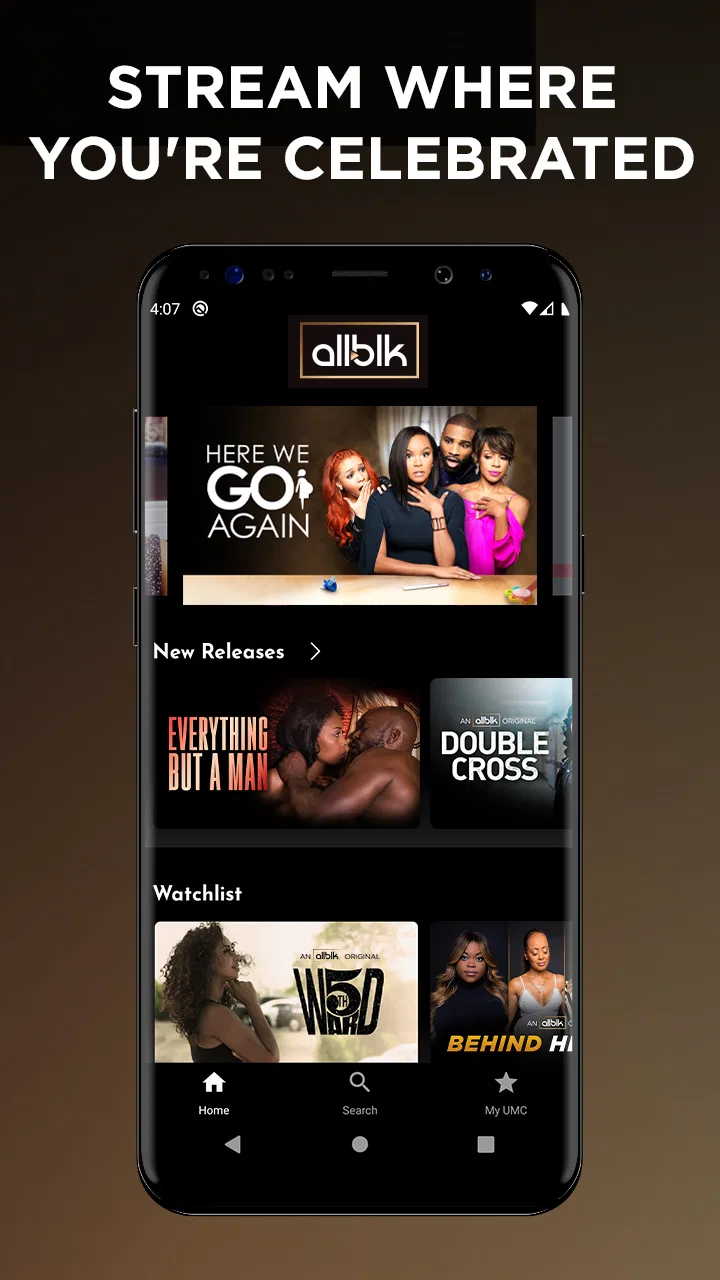
ALLBLK: Exclusive Movies & TV
- 3.5
- Rating
- 1.00M
- Installs
- Free
- Price

 Analysis by App-foxy
I spent time with ALLBLK as an entertainment app, and my first impression was that it knows exactly what kind of viewing experience it wants to provide. Rather than trying to be a general-purpose service for every audience, it focuses on Black series, films, plays, and related programming. That clear identity makes browsing feel more purposeful than opening a huge catalog and hoping something catches your attention.
The app is free to install, but the viewing experience includes in-app purchases ranging from $6.99 to $69.99 per item. That distinction matters: downloading the app costs nothing, while access to content can involve a purchase. I would treat it as a service to explore first, then decide whether its catalog fits the way I actually watch television and movies.
ALLBLK sits in the entertainment category and comes from RLJ Entertainment. It is available for Android devices running version 7.0 or later, and the current version is 5.0.29.1. The app carries a Teen content rating, so I would not assume every title is suitable for younger children simply because the app itself is easy to install.
You May Also Like
 Google Keep - Notes and lists
Google Keep’s Quiet Growth Shows the Appeal of Simpler Notes
As mobile work gets busier, Google Keep keeps winning a simple contest: capture a thought quickly, find it later, and get on with the day.

 Blood Strike: 2.5 Anniversary
Blood Strike’s Loadouts Turn Every Drop Into a Tactical Gamble
A close look at Blood Strike’s custom loadouts: how fast access to signature weapons reshapes its battle royale rhythm, rewards preparation, and narrows the gap between fights.

 Pandora - Music & Podcasts
Pandora’s Music Is Easy to Start, but Harder to Recover
Pandora’s strength is its low-effort path from a seed to a station. Its weak spot is how much confidence it asks you to place in connection, setup, and quiet recovery.

 8 Ball Pool
8 Ball Pool Is Built on Rivalries, Rematches, and Routine
A close look at the rivalries, rematches, shared routines, and unanswered safety questions that turn a quick pool match into a persistent mobile community.

 Samsung Music
Samsung Music’s Quiet Strength Is Playing What You Already Own
Its reach comes less from spectacle than from dependable access to a personal library. That simplicity is both the app’s strongest retention engine and its ceiling.

 AccuWeather: Weather Radar
AccuWeather Review: A Quick, Clear Forecast for Everyday Decisions
For everyday plans, the best forecast is the one you can understand quickly. AccuWeather makes rain timing, radar, and local conditions easy to act on, with a few trade-offs.
More From Our News Desk



How I use ALLBLK from the first browse to a regular viewing habit
I start by browsing the range of formats before choosing anything, because that quickly shows whether the catalog suits the kind of evening I have in mind. Once I find a title worth returning to, I can make a simple note of it and spend less time repeating the same search next time. The next section looks at the small setup checks that help make those visits feel more consistent.
A focused starting point instead of an endless catalog
My usual first step with a streaming app is to avoid pressing play on the first attractive thumbnail. I browse long enough to understand the shape of the catalog. With ALLBLK, that means looking across the available series, films, plays, and other programming before deciding whether it matches my mood. The focused selection is useful here because the service’s identity is visible from the beginning rather than buried beneath unrelated mainstream content.
That focus is also the main reason I would recommend it to a friend who wants Black-led and Black-centered entertainment in one place. It is not merely a convenient way to watch one particular film. The better use is to treat it as a destination: open it when I want programming connected to that audience and let the catalog guide the evening.
For a normal weekday scenario, I might open the app after dinner with only a short amount of time available. Instead of searching across several broad services, I would start with the category that best fits my mood, inspect a few titles, and choose something that can hold my attention without a long setup. On a weekend, I would use the same app differently, taking time to compare a series with a film or a play and saving the longer choice for a relaxed session.
What the free download really means
The free installation makes it easy to test the app without committing immediately. Still, I would not confuse a free download with unlimited free viewing. The presence of in-app purchases means the practical cost depends on what I want to watch and how access is presented during use. Before building a long-term routine around it, I would check the purchase screen carefully and confirm which option applies to the title or content area I have selected.
This is one of the most important habits for avoiding disappointment. I would browse first, understand the available access path, and only then decide whether to pay. Someone who expects every title to be included at no additional cost may find the experience frustrating, while someone comfortable evaluating a focused catalog before purchasing can approach it more sensibly.
Who gets the most value from the catalog
I see the strongest fit for viewers who regularly look for Black entertainment and want a service organized around that interest. It can also work well for households where different people take turns choosing what to watch, because a specialized catalog gives the conversation a clearer starting point than a massive general service.
It is less compelling for someone who wants one subscription or app to cover every major genre, studio, and blockbuster release. ALLBLK’s appeal comes from its editorial focus, not from being a replacement for every other streaming option. If my priority were the broadest possible collection or the newest mainstream releases, I would compare it with a larger general entertainment service before making it my main app.
Settings and device habits worth checking
When I install a streaming app, I check the account, playback, notification, and purchase areas before settling into regular use. In ALLBLK, that means confirming how the app handles access, reviewing any available playback choices, and making sure the account used on the device is the one I intend to use for viewing. These checks are simple, but they prevent a common problem: starting a title on one account and later wondering why the same access does not appear where expected.
I also pay attention to the device itself. On a phone, I prefer short sessions and headphones, while a larger screen makes films, plays, and longer episodes more comfortable. If the app is being used on a shared device, I would make sure the person selecting content notices the Teen rating and makes choices appropriate for everyone watching.
My most useful setup rule is to separate discovery from purchasing. I browse when I have time, note the titles that genuinely interest me, and return to the access decision once I know what I want. That keeps an appealing thumbnail from turning into an impulsive purchase and makes the service feel more deliberate.
Making browsing faster without inventing a complicated system
Experienced use does not require obscure tricks. My faster pattern is to begin with a clear question: do I want a series, a film, a play, or simply something short enough for the time available? That immediately reduces aimless scrolling. I then judge each title by whether it fits the current mood rather than trying to inspect everything in the catalog.
For a series, I look for a starting point that I can realistically continue. For a film, I consider whether I have enough uninterrupted time. For a play, I expect to give the screen more attention instead of treating it as background viewing. This small distinction helps me choose better and avoids abandoning a title simply because I started it at the wrong time.
Another practical habit is to keep a personal shortlist outside the app if the catalog is large enough to make repeated browsing tiring. I do not need a complicated spreadsheet. A short note with a few titles and the reason each one interested me is enough. When I return later, I can make a decision quickly instead of repeating the same browsing loop.
Using the app for different kinds of viewing
ALLBLK is more interesting when I use it for more than one format. A series is useful when I want a continuing routine, especially on evenings when I prefer familiar characters and a predictable return to the same story. Films are better when I want a complete experience in one sitting. Plays demand a slightly different attitude because the appeal is tied to performance and presentation rather than only to conventional episodic storytelling.
That variety gives the app a practical advantage over a service that is organized only around films and television episodes. It encourages me to choose based on the type of experience I want, not just the length of the title. I would be careful, though, not to assume that every format will suit every viewer. Someone who wants fast, casual background content may prefer a lighter viewing option, while someone looking for a more intentional evening can benefit from the broader mix.
Where the experience can become less convenient
The same specialization that makes ALLBLK appealing also narrows its role. If I open it expecting a universal replacement for several entertainment apps, I will probably judge it unfairly. Its catalog direction is the point, but that means I may still need another service for unrelated interests. Maintaining multiple apps can make account management and monthly spending harder to follow.
Purchase choices are another area where I would slow down. The listed in-app purchase range extends from $6.99 to $69.99 per item, so the difference between casually exploring and committing to a larger option can be significant. I would read the wording on each purchase screen, check whether the access matches my intended viewing period, and avoid assuming that the most expensive choice is automatically the best value.
The average rating is 3.5 from around 4,600 ratings, with roughly 1,800 written reviews. I read that as a sign to keep expectations realistic. Many people can find the catalog valuable while still encountering an interface, playback, account, or access issue that affects their opinion. I would judge the app after testing it on my own device and connection rather than treating the rating as a guarantee.
Technical expectations and everyday troubleshooting
Because the app supports Android 7.0 and later, it remains accessible to a wide range of Android users. However, compatibility does not guarantee that every older phone will feel equally comfortable for streaming. Screen size, available storage, battery condition, and connection quality can all shape the experience. On an older device, I would keep other demanding apps closed and make sure the operating system is stable before blaming the service for a poor session.
If playback becomes unreliable, I would first test whether the problem follows the app or the connection. Trying another title, moving to a stronger network, and restarting the app are sensible first steps. I would also check whether the app is current, since the listed version is 5.0.29.1 and an outdated installation can behave differently from the maintained release. These are ordinary checks, but they save time before I consider reinstalling or changing accounts.
I would also plan around the limits of mobile viewing. A phone is convenient for a commute or a short break, but it is not always the best screen for a full film or play. If I am watching with other people, I prefer a larger supported display when available; if I am alone, headphones make dialogue and performance details easier to follow without raising the volume for everyone nearby.
What I would want to know before installing
The first question is whether the app is free. The installation is free, but in-app purchases are part of the experience, so I would enter with the expectation that some access may require payment. The second question is whether it works on an older Android phone. The minimum operating system is Android 7.0, which is helpful for compatibility, though actual comfort still depends on the device.
The third question is whether it is suitable for children. The Teen content rating answers that more responsibly than a simple assumption based on the app category: parents should review what a child plans to watch and avoid handing over the catalog without supervision. The fourth question is whether it replaces a broad streaming service. In my view, it is better understood as a focused companion or specialist destination unless its particular catalog covers nearly everything a household wants.
The final question is whether the service deserves a regular place on the home screen. I would answer that through repetition rather than one enthusiastic evening. If I keep returning for its films, series, plays, and other programming, the focused design has earned its place. If I only open it when I cannot find anything elsewhere, the purchase options may not justify making it central to my routine.
My verdict after using it as a focused entertainment app
ALLBLK works best when I respect what it is trying to be. It is an entertainment app from RLJ Entertainment with a clear emphasis on Black series, films, plays, and more, and that focus gives it a stronger identity than many general catalogs. I appreciate being able to begin with a specific cultural and viewing interest instead of sorting through unrelated recommendations.
At the same time, I would not recommend installing it blindly as a complete answer to every streaming need. The free download is a low-risk way to explore, but the in-app purchase range means I would examine access carefully before spending. The Teen rating also makes content selection a household responsibility, particularly when the app is used on a shared device.
With a repeatable routine—browse by format, separate discovery from purchasing, match the title to the time available, and check the account and device settings—my experience becomes much smoother. Those habits do not unlock imaginary features; they simply help the app’s focused catalog work in my favor.
My recommendation is straightforward: install it if you specifically want a concentrated home for Black entertainment and are willing to evaluate its paid access on your own terms. Skip it as a primary choice if you mainly want the widest possible mainstream catalog or dislike managing multiple entertainment services. For the right viewer, the strongest reason to keep ALLBLK is its focused identity, not the promise of being everything at once.
FAQs for ALLBLK: Exclusive Movies & TV
01What is ALLBLK: Exclusive Movies & TV?
ALLBLK is a subscription streaming service focused on Black television, films, documentaries, comedy specials, and original programming. Its catalog includes exclusive ALLBLK productions as well as licensed titles, with content covering drama, romance, crime, reality, and comedy. The app is designed for viewers looking for culturally relevant entertainment that may not be widely available on larger mainstream platforms.
02Is ALLBLK: Exclusive Movies & TV free to download and use?
The ALLBLK app can generally be downloaded at no cost, but watching most of its content requires a paid membership. New users may occasionally receive a trial or promotional offer, although availability and terms can vary by location and by the platform used to subscribe. Before confirming payment, check the current price, billing frequency, renewal conditions, and cancellation policy shown in the app.
03What devices support the ALLBLK app?
ALLBLK is available for compatible Android and iOS mobile devices, and the service may also support selected smart TVs, streaming media players, and web browsers. Compatibility can depend on your operating system version, device model, and region. If you plan to watch on a television, verify that your specific TV or streaming device is supported before subscribing, since availability can change over time.
04Can I download ALLBLK movies and shows for offline viewing?
Offline viewing depends on the title, subscription plan, device, and current app features. If downloads are supported for your account, compatible programs normally display a download option within the ALLBLK mobile app. Downloaded content may have expiration limits and usually cannot be transferred outside the application. A stable internet connection is recommended when downloading, while streaming quality depends on your connection speed.
05Does ALLBLK offer subtitles, parental controls, and multiple profiles?
ALLBLK may provide subtitles or closed captions for supported programs, but language and accessibility options can differ between titles. Families should also review the app’s available account and parental-control settings, as these features may be more limited than those offered by larger streaming services. Before subscribing, open the settings and a few representative titles to confirm the controls and caption options you need.
Pros
- Strong selection of Black-led movies
- series
- and documentaries.
- Exclusive originals give subscribers content unavailable on many rivals.
- New releases and curated collections make discovery easy.
- Supports offline downloads for watching without an internet connection.
- Multiple profiles help households keep recommendations separate.
Cons
- Requires a paid subscription after the trial period ends.
- The catalog is smaller than major mainstream streaming services.
- Some titles may rotate out without much advance notice.
- Video quality and playback can depend heavily on your connection.
- Availability and content can vary by country or region.

ALLBLK: Exclusive Movies & TV
Gallery